Never type again!
The Complete Guide to Optical Character Recognition (OCR)
- AI Building Blocks
You constantly work with scanned documents, PDFs, text images, and other image-based materials. Optical Character Recognition (OCR) is a technology that converts these visual documents into machine-readable text so they can be searched, processed, indexed, or analyzed. OCR helps you extract useful information from images of invoices, contracts, forms, receipts, or even handwritten notes — tasks that would otherwise need manual transcription.
This overview describes what OCR is, how it functions behind the scenes, what it excels at (and where it falls short), and how you can use it safely and effectively in your daily tasks.
What You Will Learn
If you keep reading, you’ll get a clear explanation of what OCR actually does.
- You will see how OCR systems turn pixels into characters, explained in simple terms
- You will understand what OCR is good at and where it often makes mistakes
- You will learn which use cases benefit most from OCR
- You will become aware of the practical risks involved in OCR processing
- You will discover simple habits that can improve OCR accuracy and reliability
The goal is not to make you an imaging expert. The goal is to provide you with enough knowledge so you can use OCR confidently and thoughtfully.
From “Manual Typing” to Automated Text Capture
To understand OCR, it helps to start with the problem it addresses. Many documents in daily operations — scanned contracts, photos of receipts, signed forms, archived PDFs — exist only as images. A computer cannot search or analyze these images unless the text is extracted and converted into actual characters.
OCR automates this process. Instead of humans manually typing information, an OCR system examines the shapes of letters and numbers, matches them to known patterns, and produces editable text. A contract previously only available as a scanned image can suddenly be searchable; a stack of handwritten forms can be digitized; a photographed receipt can be imported into a system.
OCR does not “understand” meaning. It reads shapes and tries to map them to characters. But when documents follow consistent layouts or printing standards, OCR can process huge volumes with much greater speed and consistency than manual transcription.
Inside the OCR Pipeline: How OCR Actually Works
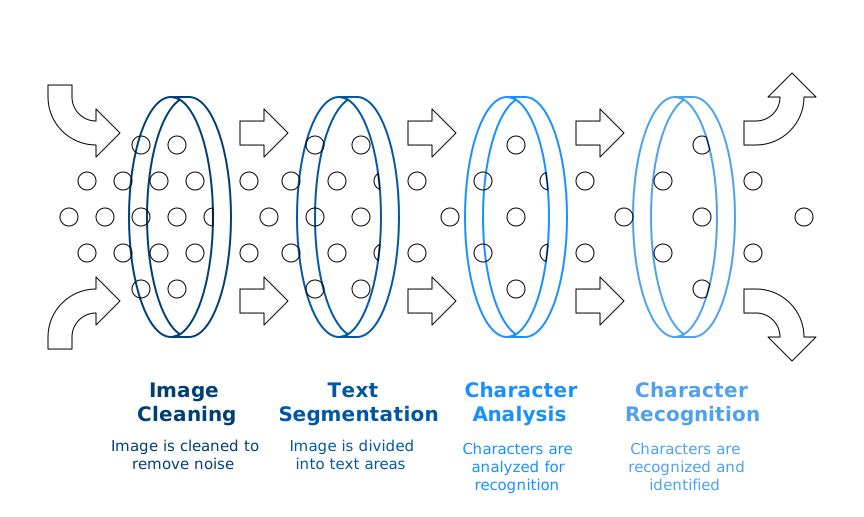
Image Acquisition and Preprocessing
OCR starts well before characters are recognized. The clarity of the input image directly impacts accuracy.
Images often contain noise, shadows, skew, or low contrast. Pre-processing fixes these issues, allowing the system to see more precise shapes. This usually involves adjusting brightness, straightening tilted pages, removing speckles, detecting edges, or converting images to a more consistent monochrome.
When pre-processing is performed effectively, the recognition stage becomes much more reliable. Conversely, if it is done poorly, even top-tier OCR engines can generate errors.
Segmentation: Identifying the Text
Before characters can be read, the system must determine where the text is located. Segmentation divides the image into:
- text regions,
- lines,
- individual characters,
- or connected components.
In simple printed documents, this process is easy. In complex layouts — such as tables, columns, stamps, signatures, and watermarks — segmentation becomes more challenging. Errors at this stage can cause text to be misread or missed.
Feature Extraction and Character Recognition
Once characters or groups of characters are isolated, the system converts visual shapes into numerical patterns.
Traditional OCR compares these patterns directly to known templates of letters and numbers. Modern OCR uses machine-learning models that analyze geometric features, curves, intersections, and pixel arrangements to recognize characters even in noisy or distorted images.
The recognition output is a sequence of characters that the model believes corresponds to the shapes it observed.
Post-processing and Error Correction
Character recognition alone is rarely perfect, so OCR systems typically use language-aware correction.
If the system reads “T1ME” instead of “TIME,” dictionary checks or linguistic models can correct it. If a date is partially misread, formatting rules can help fix errors. For invoices or forms, domain-specific rules can also fill in gaps.
Post-processing often decides whether OCR results are usable or unreliable.
What OCR Can Do Well Today
OCR works best in settings where documents have clear visual layouts and printing conventions.
It can convert large volumes of scanned PDFs into searchable archives. It can extract text from standard forms, receipts, and invoices, enabling that data to be used in downstream systems. It allows searching within scanned legal documents, contracts, and reports. It enables the analysis of historical paper archives at scale.
OCR also supports mobile use cases. Photos of IDs, packaging labels, or handwritten notes can be converted into text that applications can read or save. When combined with document workflows, OCR eliminates the need for manual copying and typing.
In all these cases, OCR provides speed and consistency that human transcription cannot match.
The Structural Limitations You Can't Ignore
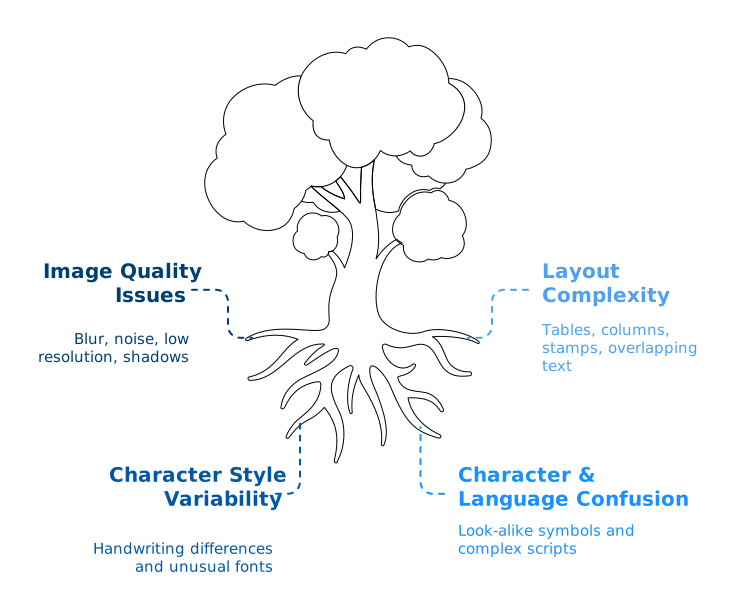
OCR has obvious limitations due to its underlying mechanics.
OCR relies heavily on image quality. Low resolution, shadows, folds, glare, skew, or noise can lead to misreading characters. Decorative or unusual fonts are also challenging to recognize reliably. Handwriting, especially cursive, remains one of the most error-prone inputs.
OCR struggles with complex layouts. Tables, dense formatting, sidebars, stamps, signatures, and overlapping text create ambiguity. If the system cannot segment the image correctly, subsequent recognition becomes unreliable.
Another limitation is that OCR does not understand meaning. It can misread “8” as “B” or “1” as “I” without recognizing that the result makes no sense. Post-processing can fix some errors, but it cannot fully compensate for poor recognition.
Finally, OCR accuracy varies significantly across different languages. Alphabetic languages with distinct letter boundaries tend to have higher accuracy. Languages with complex scripts or numerous character variations tend to produce more errors.
The Risk Landscape: Practical Pitfalls to Watch Out For
Structural limitations pose real risks when OCR is used in operational workflows.
Incorrect extractions can result in wrong amounts, dates, or names being stored in systems. Missing characters can break reference numbers or legal identifiers. Layout errors can cause text to be read in the wrong order.
Privacy and compliance risks come up when sensitive scanned documents — such as contracts, IDs, and medical forms — are handled in uncontrolled environments. Some OCR services need uploading images to external servers, which might not be acceptable in regulated settings.
Operational risks also include over-reliance on OCR output and the assumption that text extraction is always correct. Without verification or sampling, errors can go unnoticed and accumulate. In cost-sensitive workflows, high-volume OCR tasks may also lead to unnecessary processing expenses if usage isn’t monitored.
These risks do not suggest that OCR should be avoided. They indicate that OCR must be used with proper safeguards, accuracy checks, and realistic expectations.
Where OCR Generates Real Business Value
OCR provides value whenever organizations handle image-based or paper documents.
In finance and accounting, OCR can digitize receipts, invoices, and statements, enabling automated import into ERP and expense systems. In legal and compliance functions, OCR converts scanned contracts and policies into searchable repositories. In operations, OCR helps digitize forms, delivery notes, and service records.
Historical archives also gain advantages. Years of scanned documents can be indexed and searched, facilitating knowledge discovery and lowering the need for manual lookup. For mobile apps, OCR can instantly capture ID numbers, codes, or labels.
The typical outcome is that OCR eliminates manual transcription, speeds up document processing, and unlocks previously inaccessible text.
Practical Tips for Safe and Effective OCR Use
A few practical habits can greatly enhance OCR accuracy.
Good input quality is essential. Clear scans, good lighting, straight images, and high resolution all lessen errors. Standardized forms and consistent templates also assist.
It is crucial to select OCR engines that support the languages and character sets you actually use. Some engines work well in English but perform poorly in languages with accents or non-Latin scripts.
Human review is still vital for high-impact documents. OCR results should be checked when mistakes could influence financial, legal, or compliance results.
Monitoring accuracy is just as important. Sampling output, tracking error patterns, and updating templates help sustain performance over time.
Key Takeaways
OCR converts images of text into machine-readable characters. It offers significant efficiency improvements in document-heavy settings by automating text capture and cutting down manual transcription.
Its strengths are speed, scalability, and the ability to extract content from scanned or photographed documents. Its limitations include sensitivity to image quality, difficulties with complex layouts, variability across fonts and languages, and the lack of genuine linguistic understanding.
OCR delivers the greatest value when paired with clear workflows, controlled input quality, human verification for sensitive content, and continuous monitoring. With proper practices, OCR becomes a dependable base for digitization and document automation.
To Sum Things Up
OCR offers a practical way to convert images, scans, and photographed documents into usable digital text. It doesn’t comprehend meaning and can’t ensure perfect accuracy, but it reliably automates the initial step of digitization when documents maintain consistent layouts and quality standards. Its limitations — such as noise, complex layouts, font variations, and poor image quality — highlight why OCR output always benefits from human review, template consistency, and ongoing monitoring.
When used thoughtfully, OCR provides a reliable basis for processing large amounts of paper or image-based materials. By establishing clear workflows, ensuring good input quality, and setting realistic expectations, it minimizes manual typing, speeds up document processing, and makes previously inaccessible text searchable, analyzable, and usable by downstream systems.

Lajos Fehér
Lajos Fehér is an IT expert with nearly 30 years of experience in database development, particularly Oracle-based systems, as well as in data migration projects and the design of systems requiring high availability and scalability. In recent years, his work has expanded to include AI-based solutions, with a focus on building systems that deliver measurable business value.
Related posts




Why So Many AI Projects Stall — and How to Finally Move Beyond the Pilot Phase

The Strategic Trade-Off That Shapes Data Security, Compliance, and Long-Term Control